Managing Risk
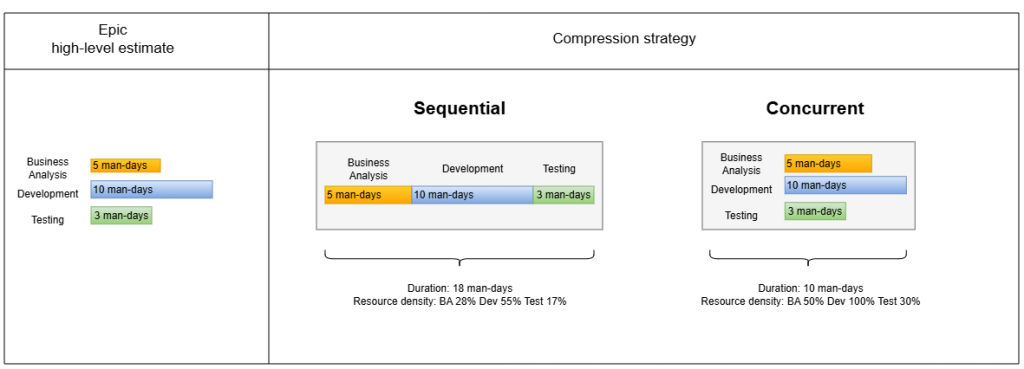
Compression is used to manage risk and choose between slow and rapid styles of execution. Compression is implemented on epic level and defines if epic activities will be done sequentially or concurrently.
Epics compression is available in two options:
- Sequential (Safe/Slow): delivery date is calculated by sum of duration of all epic activities. Best for high-risk small teams with high-quality focus.
- Concurrent (Risky/Fast): delivery date is calculated by the duration of the longest activity. Best for low-risk cross-functional teams.
Changing Compression
The compression can be changed either in the timebox or epic settings.
To change compression for all epics inside the timebox, navigate to timebox actions in the Roadmap Editor and click “Manage Risk”. In the modal select the desired compression for the “Internal Epics Compression” setting.
To change compression individually for a single epic, click on that epic in Roadmap Editor. In the right sidebar, open the “Schedule” tab. Change the compression field to the desired value.
0 Comments